Menu Horisontal

Minggu, 30 Desember 2012

File dan Direktori VB.net

Sumber : http://tidipia-comp.blogspot.com/2011/12/file-dan-direktori-vbnet.html
Ok, teman-teman dan bapak-ibu semua, kali ini saya hendak membahas tentang mengutak-atik file dan direktori dengan menggunakan Visual Basic .Net.

Biasanya yang paling sering dibutuhkan pada project .Net anda terkait dengan file dan direktori adalah, menggandakan (copy), menghapus (delete) atau bahkan mengecek apakah file/direktori tersebut sudah ada dalam direktori lain.

Dan langsung saja, dibawah ini mudah-mudahan bisa menjadi jawabanya :

Directory / Folder.
Syntax untuk membuat direktori. Contoh membuat folder "testdir1" :
System.IO.Directory.CreateDirectory("C:\testDir1")

Syntax untuk mengecek apakah folder "testDir1" sudah ada atau belum pada path tertentu :
System.IO.Directory.Exists("C:\testDir1")

Syntax contoh untuk memindahkan folder "testDir2" yang berada didalam folder "C:\testDir1" ke folder "C:\testDir3" :
System.IO.Directory.Move("C:\testDir1\testDir2", "C:\testDir3")

Syntax untuk menghapus folder "testDir1" :
System.IO.Directory.Delete("C:\testDir1")

Mencari Selisih Tanggal dan Bulan VB.Net

 Sumber : http://tidipia-comp.blogspot.com/2011/12/mencari-selisih-tanggal-dan-bulan-vbnet.html

Masih dengan tema tanggal, berikut cara untuk mencari selisih tanggal dan bulan antara data tanggal pertama dan data tanggal kedua. Tidak sulit kok, karena .Net sudah menyertakan fungsi tersebut dengan menggunakan "DateDiff" , dibawah adalah contoh penggunaanya saja :

Disini untuk data rentang tanggalnya saya gunakan contoh dengan menggunakan DateTimePicker dan nilai kembali dengan tipe data Integer.
Ok, masukan dua buah DateTimePicker ke dalam form, kemudian ubah namanya :
Untuk tanggal awal ubah menjadi "dtPicker1", dan rentang tanggal akhir-nya dtPicker2.

Menghitung selisih tanggal :
Private Function HitungTanggal() As Integer
Return DateDiff(DateInterval.Day, dtPicker1.Value.Date, dtPicker2.Value.Date)
End Function

Menghitung selisih bulan :
Private Function HitungBulan() As Integer
Return DateDiff(DateInterval.Month, dtPicker1.Value.Date, dtPicker2.Value.Date)
End Function

Jika yang dicari selisih tanggal awal atau tanggal akhirnya hari ini, ganti dtPicker1/dtPicker2 dengan Date.Now .

Nah, pada aplikasi penggajian biasanya sering membutuhkan fungsi untuk menghitung jumlah hari juga, tapi tidak termasuk hari sabtu/minggu atau mencari jumlah hari kerja. Bagaimanakah caranya ? Berikut cuplikan syntax-syntax pada fungsi tersebut :

Private Function HitungHariKerja() As Integer
Dim tmpDate = Date.Now
Dim intResult As Integer = DatePart(DateInterval.Day, DateAdd(DateInterval.Day, -1, _
DateAdd(DateInterval.Month, 1, DateAdd(DateInterval.Day, _
DatePart(DateInterval.Day, Date.Now) + 1, Date.Now))))

For i As Integer = 0 To intResult
If Weekday(tmpDate) = 1 Then 'hari minggu (1)
intResult += -1
End If

If Weekday(tmpDate) = 7 Then 'hari sabtu (7)
intResult += -1
End If

tmpDate = DateAdd(DateInterval.Day, 1, tmpDate)
Next

Return intResult
End Function

Fungsi diatas jumlah hari kerja yang dicari adalah bulan dari tanggal sekarang, syntax nya terdapat pada deklarasi pertama kali (Dim tmpDate = Date.Now). Jika anda hendak mencari jumlah hari kerja bulan berikutnya atau bulan lalu, "Date.Now" pada deklarasi "tmpDate" bisa dikombinasikan dengan fungsi "DateAdd". Misalkan anda ingin menambahkan dua bulan berikutnya dari sekarang :
Dim tmpDate = DateAdd(DateInterval.Month, 2, Date.Now)

atau dua bulan lalu dari sekarang :
Dim tmpDate = DateAdd(DateInterval.Month, -2, Date.Now)

Bagaimana penjelasan saya kira-kira? apakah mudah dimengerti? Jika ada pertanyaan, saran, kritik atau masukan (cacian dan makian tidak termasuk) silahkan tinggalkan komentar dibawah. Terima kasih sudah berkunjung, semoga bermanfaat.

Casting Tipe Data VB.Net

Sumber : http://tidipia-comp.blogspot.com/2011/12/casting-tipe-data-vbnet.html
 
Nah sekarang kita akan membahas tentang casting tipe, dan dua keyword casting yang paling sering digunakan biasanya CType dan DirectCast. CType adalah kode konversi menjadi bagian dari kode yang mengevaluasi ekspresi. Oleh karena tidak ada pemanggilan ke prosedur, akibatnya CType akan dieksekusi lebih cepat. Berikut contoh dari CType :

Dim int As Integer = 1
Dim b As Boolean, c As Boolean

'Casting int ke Boolean, b = True
b = CType(int, Boolean)

Perhatian! CType bukan merupakan jalan satu-satunya menuju kesukesan solusi casting pada semua tipe. Khusus untuk casting dari tipe Object ke tipe lainnya, sebaiknya gunakan DirectCast. Lihat pada contoh dibawah :
Dim x As Integer = 123

' Boxing x ke Object
Dim myObj As Object = x

Console.WriteLine(”myObj= ” & myObj.ToString())
' Output: myObj= 123

' Unboxing, secara eksplisit
Dim y As Integer = DirectCast(myObj, Integer)

Console.WriteLine(”y= ” & y)
' Output: y= 123

Pada saat melakukan casting suatu objek ke tipe yang lebih spesifik, DirectCast lebih baik dibanding CType, karena ia tidak menggunakan method-method pembantu runtime.

Mulai dari VB.NET 2005 ke atas, ditambahkan keyword casting baru, yaitu TryCast. Perbedaan mendasar antara TryCast dengan CType dan DirectCast adalah mengenai nilai yang dikembalikan ketika operasi gagal dilakukan. Baik CType maupun DirectCast, keduanya sama-sama mengembalikan nilai InvalidCastException pada objek, sedangkan TryCast akan mengembalikan Nothing. Perhatikan contoh dibawah, agar lebih mantab ilmu kanuragan nya :

Function TestCast(ByVal o As Object) As String
Dim obj As IConvertible = TryCast(o, IConvertible)
If obj Is Nothing Then
Return "Objek tidak dapat dikonversi"
Else
Return "Tipe kode " & obj.GetTypeCode()
End If
End Function

Segitu dulu penjelasan seputar VB.Net mengenai Casting Tipe Data, terima kasih dan semoga bermanfaat.

Bersihkan Isi Semua TextBox pada Form VB.Net

Pada VB.6 Control TextBox bisa dibuat array, sehingga untuk membersihkan nya tinggal me-loop array dari Control TextBox tersebut lalu mengosongkan isinya. Pada Paltform .Net objek atau kontrol tidak bisa dibuat array, kalaupun bisa diakalin malah akan menambah syntax-syntax nya makin jelimet.

Dibawah ini contoh memberishkan isi semua TextBox pada form :
Private Sub ClearTextBox(ByVal frm As System.Windows.Forms.Form)
For Each ctl As Control In frm.Controls
If TypeOf ctl Is TextBox Then
CType(ctl, TextBox).Text = String.Empty
End If
Next
End Sub

Penggunaanya di dalam form tersebut :
ClearTextBox(Me)
Perhatian !!! Contoh diatas Jika TextBox anda berada pada form tanpa GroupBox, jika TextBox di form tersebut berada didalam GroupBox maka syntax nya akan berbeda lagi. Perhatikan perbedaanya :
Public Sub ClearTextBoxInBox(ByVal grb As System.Windows.Forms.GroupBox)
For Each ctl As Control In grb.Controls
If TypeOf ctl Is TextBox Then
CType(ctl, TextBox).Text = String.Empty
End If
Next
End Sub

Maka contoh penggunaanya :
CearTextBoxInBox(GroupBox1)
Sumber : http://tidipia-comp.blogspot.com/2011/12/bersihkan-isi-semua-textbox-pada-form.html

Sedikit penjelasan kedua fungsi diatas, "ctl" didekarasikan sebagai Control langsung pada saat di-looping dengan "for-each" pada syntax :
For Each ctl as Control In grb.Controls

karena yang di-looping objek nya bersifat global (Control), maka untuk pencarian objek TextBox perlu dilakukan validasi control dengan menyertakan TypeOf pada operator bersyarat "If" :
If TypeOf ctl Is TextBox Then

selanjutnya, jika ditemukan maka "ctl" (Control) di-casting ke bentuk object TextBox :
CType(ctl, TextBox).Text = String.Empty

Dan anda bisa melakukan modifikasi jika ingin menghapus isi TextBox pada semua GroupBox didalam form, caranya dengan membuat If Bersarang (If Nested). Pada If pertama lakukan validasi GroupBox, lalu letakan kondisi lagi didalamnya (If kedua) dengan validasi TextBox.

Terima kasih atas kunjunganya, semoga bermanfaat.

Selasa, 25 Desember 2012

Enable Remote Connection on SQL Server 2008 Express

Sumber : http://www.linglom.com/2009/03/28/enable-remote-connection-on-sql-server-2008-express/

Introduction

Last time, I wrote an article show how to enable remote connection on SQL Server 2005 Express. Now SQL Server 2008 Express is released for a while, it doesn’t allow remote connection on default installation as on SQL Server 2005 Express. So you have to enable it manually.


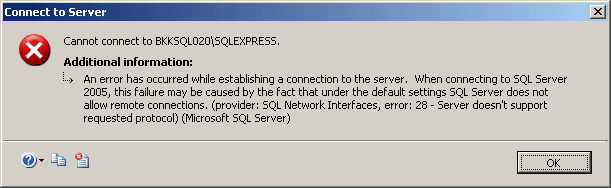
If you’re trying to connect to SQL Server 2008 Express remotely without enable remote connection first, you may see these error messages:
  • “Cannot connect to SQL-Server-Instance-Name
    An error has occurred while establishing a connection to the server. When connecting to SQL Server 2005, this failure may be caused by the fact that under the default settings SQL Server does not allow remote connections. (provider: SQL Network Interfaces, error: 28 – Server doesn’t support requested protocol) (Microsoft SQL Server)”

    Server doesn't support requested protocol
  • “Cannot connect to SQL-Server-Instance-Name
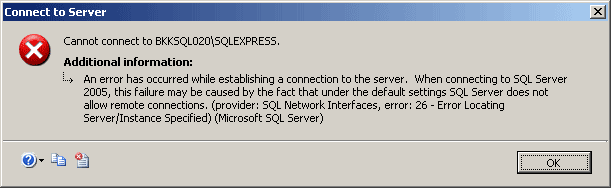
    An error has occurred while establishing a connection to the server. When connecting to SQL Server 2005, this failure may be caused by the fact that under the default settings SQL Server does not allow remote connections. (provider: SQL Network Interfaces, error: 26 – Error Locating Server/Instance Specified) (Microsoft SQL Server)”

    Error Locating Server/Instance Specified
  • “Cannot connect to SQL-Server-Instance-Name
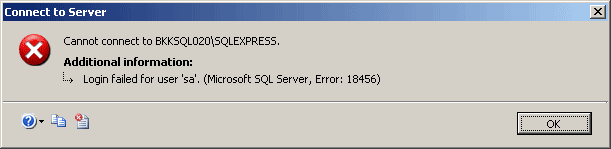
    Login failed for user ‘username‘. (Microsoft SQL Server, Error: 18456)”

    Login failed for user 'sa'
To enable remote connection on SQL Server 2008 Express, see the step below:
  1. Start SQL Server Browser service if it’s not started yet. SQL Server Browser listens for incoming requests for Microsoft SQL Server resources and provides information about SQL Server instances installed on the computer.
  2. Enable TCP/IP protocol for SQL Server 2008 Express to accept remote connection.
  3. (Optional) Change Server Authentication to SQL Server and Windows Authentication. By default, SQL Server 2008 Express allows only Windows Authentication mode so you can connect to the SQL Server with current user log-on credential. If you want to specify user for connect to the SQL Server, you have to change Server Authentication to SQL Server and Windows Authentication.
Note: In SQL Server 2008 Express, there isn’t SQL Server Surface Area Configuration so you have to configure from SQL Server Configuration Manager instead.

Step-by-step

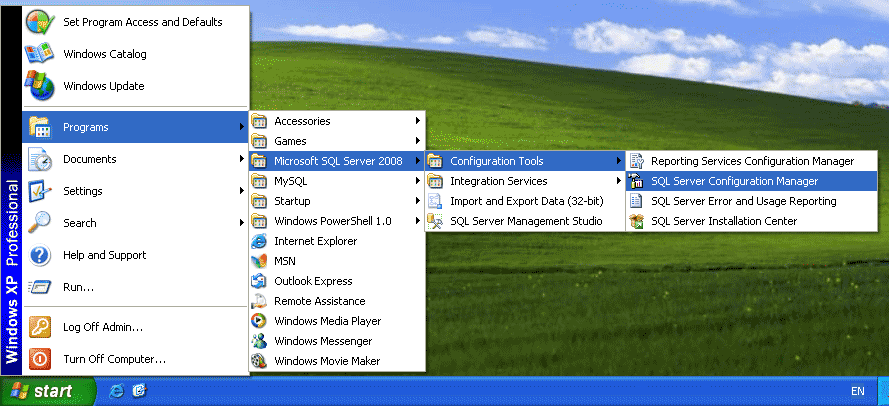
  1. Open SQL Server Configuration Manager. Click Start -> Programs -> Microsoft SQL Server 2008 -> Configuration Tools -> SQL Server Configuration Manager.
    SQL Server Configuration Manager
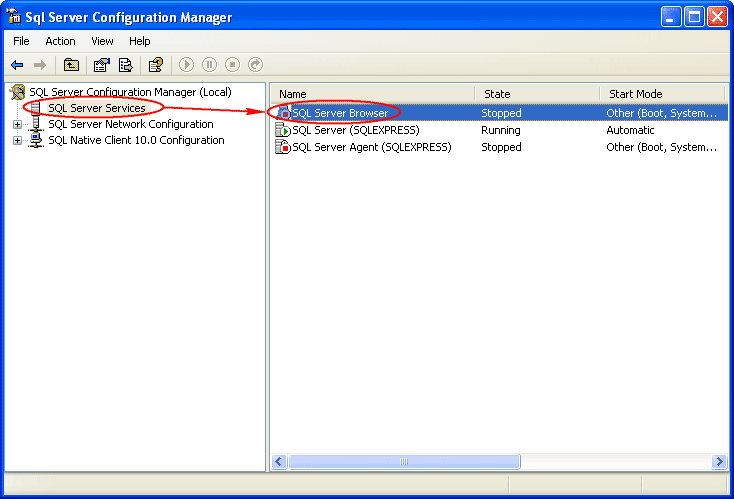
  2. On SQL Server Configuration Manager, select SQL Server Services on the left window. If the state on SQL Server Browser is not running, you have to configure and start the service. Otherwise, you can skip to step 6.
    SQL Server Browser Service
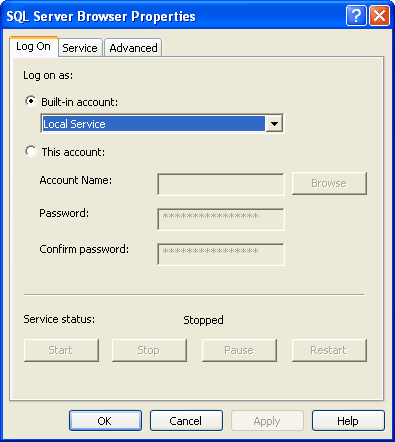
  3. Double-click on SQL Server Browser, the Properties window will show up. Set the account for start SQL Server Browser Service. In this example, I set to Local Service account.
    Set Startup Account
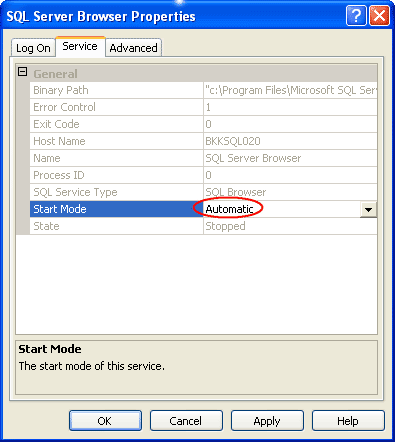
  4. On SQL Server Browser Properties, move to Service tab and change Start Mode to Automatic. Therefore, the service will be start automatically when the computer starts. Click OK to apply changes.
    Set Start Mode to Automatic
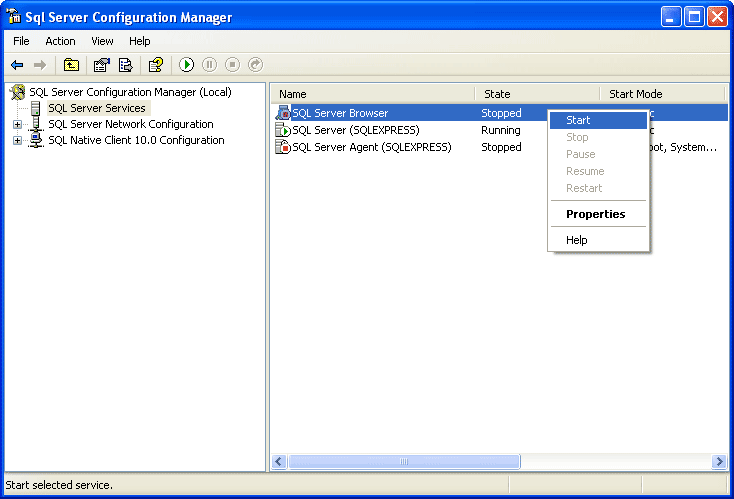
  5. Back to SQL Server Configuration Manager, right-click on SQL Server Bowser on the right window and select Start to start the service.
    Start SQL Server Browser Service
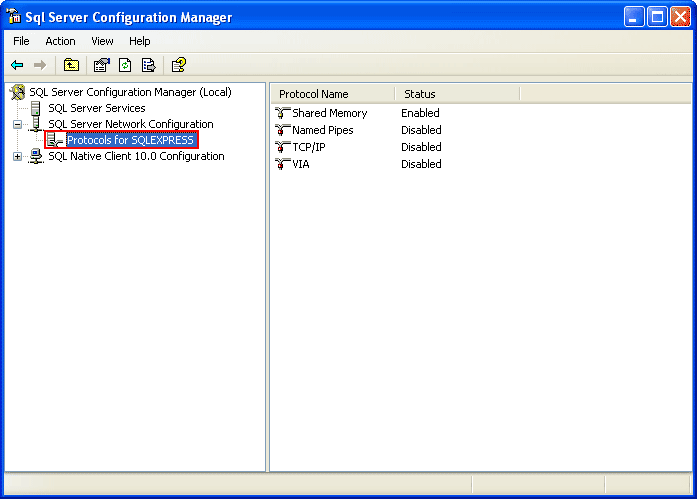
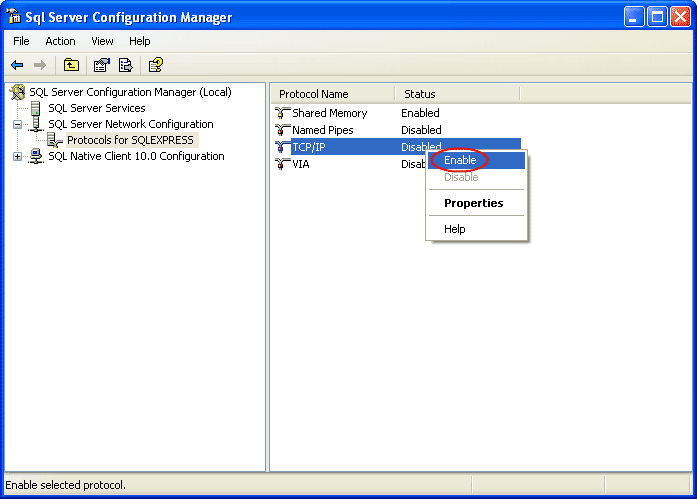
  6. On the left window, expand SQL Server Network Configuration -> Protocols for SQLEXPRESS. You see that TCP/IP protocol status is disabled.
    Protocols for SQL EXPRESS
  7. Right-click on TCP/IP and select Enable to enable the protocol.
    Enable TCP/IP protocol
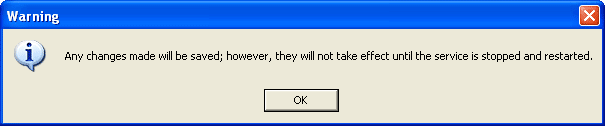
  8. There is a pop-up shown up that you have to restart the SQL Service to apply changes.
    Need to Restart SQL Server Service
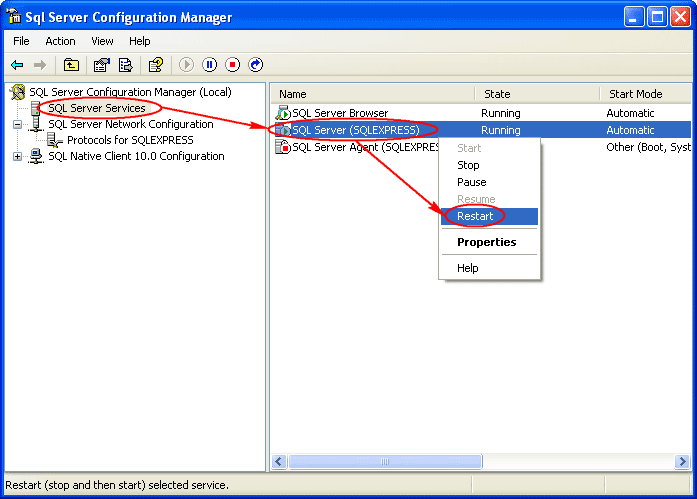
  9. On the left window, select SQL Server Services. Select SQL Server (SQLEXPRESS) on the right window -> click Restart. The SQL Server service will be restarted.
    Restart SQL Server Service
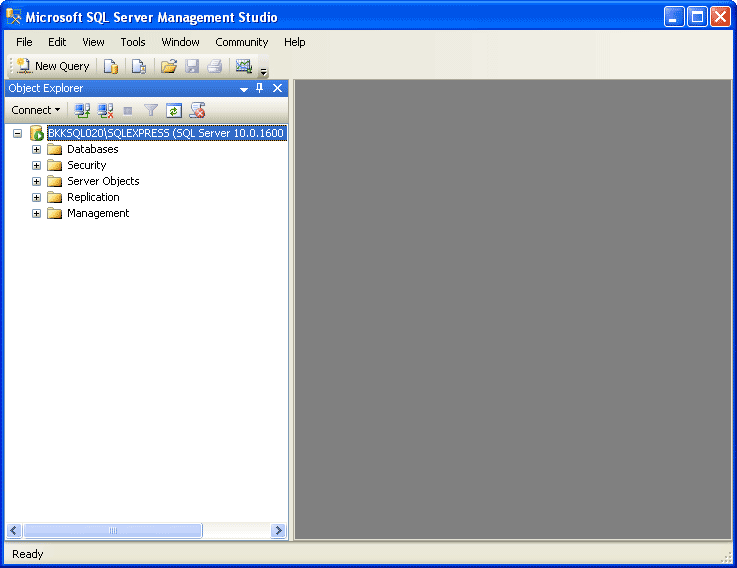
  10. Open Microsoft SQL Server Management Studio and connect to the SQL Server 2008 Express.
    Open Microsoft SQL Server Management Studio
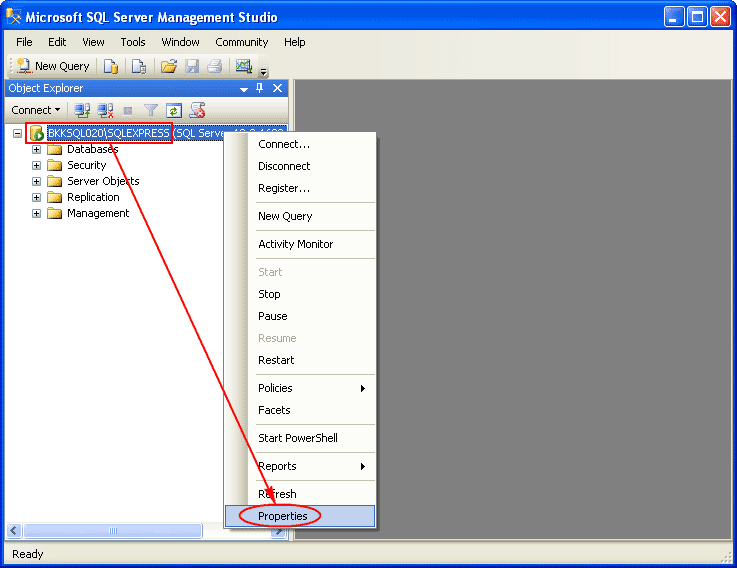
  11. Right-click on the SQL Server Instance and select Properties.
    Open Server Properties
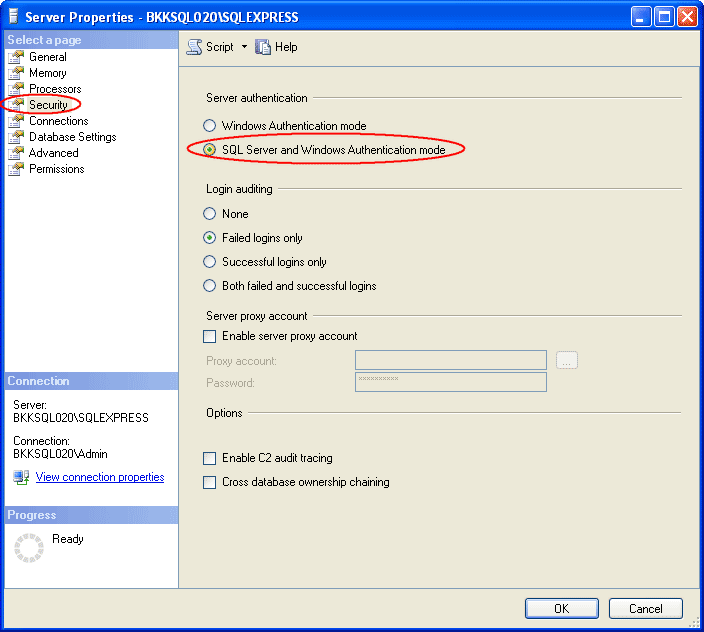
  12. On Server Properties, select Security on the left window. Then, select SQL Server and Windows Authentication mode.
    Change Authentication to SQL Server and Windows Authentication
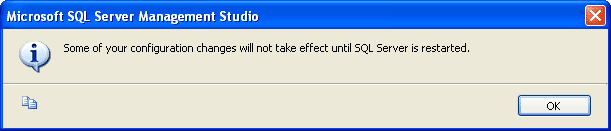
  13. Again, there is a pop-up shown up that you have to restart the SQL Service to apply changes.
    Need to Restart SQL Server Service
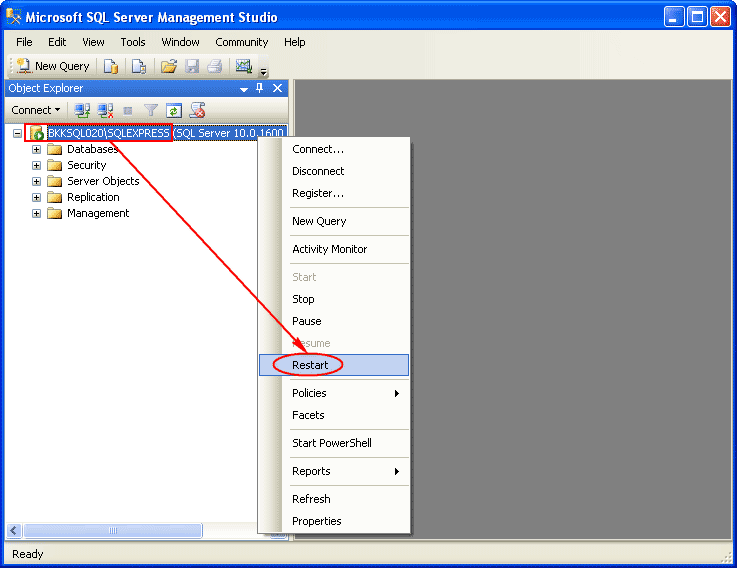
  14. Right-click on the SQL Server Instance and select Restart.
    Restart SQL Server Service
  15. That’s it. Now you should be able to connect to the SQL Server 2008 Express remotely.

Selasa, 11 Desember 2012

Menyisipkan Kontrol Baru

Sumber : http://pujanggavb.wordpress.com/2008/11/14/menyisipkan-kontrol-baru/

Menambahkan sebuah kontrol pada saat design mode memang mudah sekali. Anda tinggal memilih jenis kontrol yang disediakan ToolBox, kemudian melakukan dragging pada badan form. Bisakah Anda menciptakan atau menambahkan kontrol baru pada saat runtime atau melalui jendela kode?
Teknik berikut ini adalah teknik untuk menciptakan kontrol baru. Cukup aneh memang, Anda tidak memasukkan kontrol apapun, namun ketika program berjalan form tiba-tiba menciptakan kontrol-kontrol baru. Lebih aneh lagi kontrol-kontrol ini dapat diperintah layaknya kontrol yang Anda desain saat design mode.
Berikut ini contoh program untuk menyisipkan sebuah PictureBox, beberapa TextBox dan sebuah VScrollBar yang dijalankan ketika runtime.
Stop! Tidak perlu melakukan design apapun, ketikkan kode di bawah ini.


Option Explicit

   Dim ctl As Control
   Dim i As Long
   Dim AkhirTinggi As Long
   Dim AwalTop As Long

   Dim JumTextBox As Integer
   Dim myVsb As Control

  Dim WithEvents vsbScroll As VScrollBar
  Dim WithEvents Picture1 As PictureBox

  Private Sub Form_Load()
      'Membuat PictureBox
      Set ctl = Me.Controls.Add("VB.PictureBox", _
          "Picture1")
      ctl.Visible = True

      ctl.Move 0, 0, Me.ScaleWidth, Me.ScaleHeight
      Set Picture1 = ctl

      'Membuat TextBox baru
      JumTextBox = 20 '<-- banyaknya="banyaknya" br="br" textbox="textbox">      For i = 0 To JumTextBox
          Set ctl = Me.Controls.Add("VB.TextBox", _
          "Text" & CStr(i))
          'Agar kontrol ditampung PictureBox
          Set ctl.Container = Picture1
          'Memposisikan dan mengatur ukuran TextBox
          ctl.Move 60, 60 + (330 * i), 2000, 285

          AkhirTinggi = i * (60 + (330 * i) + 285)
          'Mengisi properti Text
          'sesuai dengan nama TextBox
          ctl.Text = ctl.Name

          'Menampilkan TextBox
          ctl.Visible = True
      Next

      'Membuat ScrollBar vertical
      Set ctl = Me.Controls.Add("VB.VScrollBar", _
          "vsbScroll")
      Set ctl.Container = Picture1
      ctl.Move Picture1.Width - 350, 0, 280, Picture1.Height - 100
      ctl.Max = JumTextBox * 300 + Picture1.Height
      ctl.SmallChange = 100
      ctl.LargeChange = 200
      ctl.Visible = True

      Set vsbScroll = ctl
  End Sub

  Sub vsbScroll_Change()
      'Memindahkan posisi TextBox
      For Each ctl In Me.Controls
          If TypeOf ctl Is TextBox Then
              ctl.Top = ctl.Top + (AwalTop - vsbScroll.Value)
          End If
      Next
      AwalTop = vsbScroll.Value
  End Sub

  Sub vsbScroll_Scroll()
      vsbScroll_Change
  End Sub

  Private Sub VScroll1_Change()
      For Each ctl In Me.Controls
          If TypeOf ctl Is TextBox Then
              ctl.Top = ctl.Top + (AwalTop - VScroll1.Value)
          End If
      Next

      AwalTop = VScroll1.Value
  End Sub
Jalankan program (F5), lihatlah apa yang terjadi! CObalah untuk mengklik atau menggerakan batang penggulung (VScrollBar).

Jumat, 05 Oktober 2012

PHP RSS Executing Microsoft SQL Server Stored Procedure from PHP on Linux Read more at http://www.devarticles.com/c/a/PHP/Executing-Microsoft-SQL-Server-Stored-Procedure-from-PHP-on-Linux

Sumber : http://www.devarticles.com/c/a/PHP/Executing-Microsoft-SQL-Server-Stored-Procedure-from-PHP-on-Linux/7/

On my Windows box (home2k), I use Microsoft SQL Server query analyzer to create the following stored procedure on pubs database (I will use this stored procedure on Sybase SQL Server with pubs2 database in my next article):
CREATE PROC sp_GetBooksByPrice
@minPrice money,
@maxPrice money,
@lowestPricedBook varchar(100) OUTPUT,
@highestPricedBook varchar(100) OUTPUT
AS
DECLARE @realminPrice money,  @realmaxPrice money, @totalBooks int
SELECT @realminPrice = min(price) FROM titles WHERE price >=@minPrice
SELECT @realmaxPrice = max(price) FROM titles WHERE price <
=@maxPrice
SELECT @lowestPricedBook =title FROM titles WHERE price = @realminPrice
SELECT @highestPricedBook =title  FROM titles WHERE price = @realmaxPrice
SELECT @totalBooks = COUNT(title)  FROM titles WHERE price >= @minPrice AND price <= @maxPrice
RETURN  @totalBooks
GO

On the Red Hat side, use an editor to create the following file called sp_test.php:
$myServer = "home2k";
$myUser = "sa";
$myPass = "";
$myDB = "pubs";

$s = mssql_connect($myServer, $myUser, $myPass)
or die("Couldn't connect to SQL Server on $myServer");

mssql_select_db($myDB, $s)
or die("Couldn't open database $myDB");

$proc = mssql_init("sp_GetBooksByPrice", $s);
$minPrice = 2.00;
$maxPrice = 20.00;
$lowestPricedBook = "";
$highestPricedBook = "";
$numBooks = 0;

// Bind the parameters
mssql_bind($proc, "@minPrice", $minPrice, SQLFLT8);
mssql_bind($proc, "@maxPrice", $maxPrice, SQLFLT8);
mssql_bind($proc, "@lowestPricedBook", $lowestPricedBook, SQLVARCHAR, TRUE, FALSE,100);
mssql_bind($proc, "@highestPricedBook", $highestPricedBook, SQLVARCHAR, TRUE, FALSE,100);

// Bind the return value
mssql_bind($proc, "RETVAL", $numBooks, SQLINT2);
mssql_execute($proc);
mssql_free_statement ($proc);
mssql_close($s);

echo "

There were $numBooks Books returned.

";
echo "The lowest price book was: $lowestPricedBook.
";
echo "The highest price book was: $highestPricedBook.";
?>

Save the file in /usr/local/Apache2/htdocs, open your browser, and input http://localhost/sp_test.php in address bar. It is useful when you debug your PHP code with MS SQL Server.
Read more at http://www.devarticles.com/c/a/PHP/Executing-Microsoft-SQL-Server-Stored-Procedure-from-PHP-on-Linux/7/#GMapUYYU2SbkICRo.99

Cara Lain Ada di : http://www.daniweb.com/web-development/php/threads/112159/php-mssql-stored-procedure-with-parameters-in-and-out

gave up trying to do the output code version of the Stored Procedure call, instead I changed my Stored Procedure to return a single row which would contain the information I needed.
Then, to call the MS SQL Server 2000 Stored Procedure from PHP, I did the following:
  
// Connect to SQL Server and check for errors
  1. $conn = mssql_connect($db_host,$db_user,$db_password);
  2. if ($conn===false)
  3. {
  4. echo 'Cannot connect to SQL Server Database. Please try again later. ';
  5. exit;
  6. }
  7. if (mssql_select_db("MyDatabase",$conn) === false)
  8. {
  9. echo 'Cannot connect to MyDatabase. Please try again later. ';
  10. exit;
  11. }
  12. $proc = mssql_init('MyStoredProcedure',$conn);
  13. mssql_bind($proc,'@ParameterOne',$ParameterOne,SQLVARCHAR);
  14. mssql_bind($proc,'@ParameterTwo',$ParameterTwo,SQLVARCHAR);
  15. mssql_bind($proc,'@ParameterThree',$ParameterThree,SQLVARCHAR);
  16. if ($result = mssql_execute($proc))
  17. {
  18. if ($row = mssql_fetch_row($result))
  19. {
  20. // now you can deal with the $row array to check out your results
  21. }
  22. }